Stop scheduling crews in notebooks and group chats
In many small companies, the daily plan gets made in the evening over the phone, in a notebook or in a WhatsApp group. In the morning someone missed the message, someone took the wrong van, and a client is left waiting.
Power Play Manager keeps the daily plan in one place, linked to jobs, clients, people and vehicles. Everyone looks at the same information.
What goes into the daily plan
For each day you pick the crews and assign them to jobs and sites.
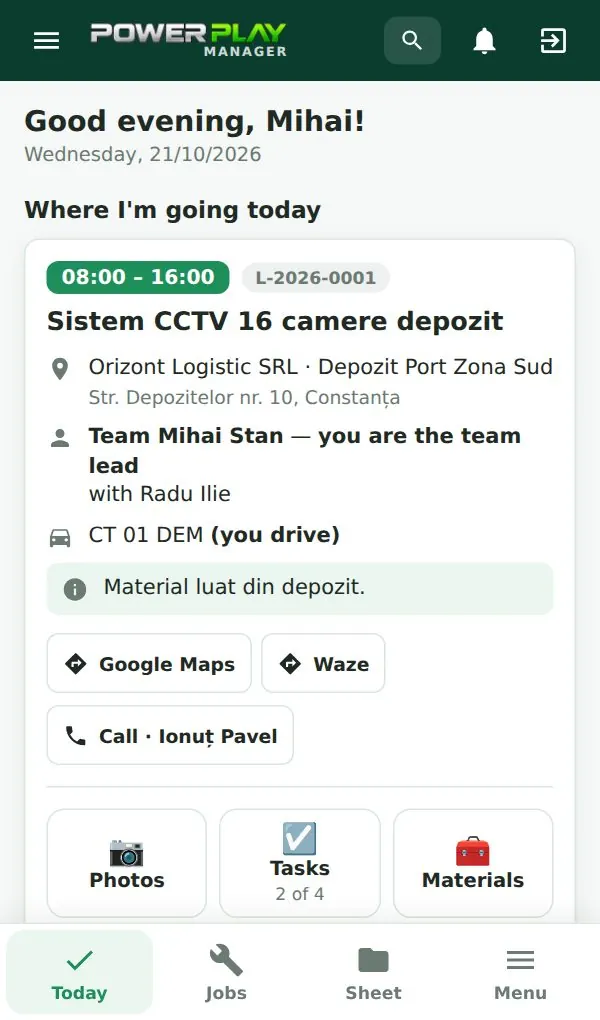
- who goes to which client and which job
- which vehicle the crew takes
- who is the team lead
- each person sees a Today screen on the phone with their addresses and tasks
- see who has opened the plan and who hasn't
- copy rows from another day for jobs that continue
- share the plan as an image to WhatsApp
Calendar and jobs in stages
The daily plan ties into the calendar and to your jobs. Each job has stages, a team, photos, materials, tasks and a log, so the crew on site knows what was done before and what comes next.
Notifications go out in the app, by email, as push notifications on the phone, or as one-click WhatsApp messages. With the optional messages module, you also see who has read a message sent to the day's team.
Works for any trade with crews on site
Scheduling works the same for a crew installing cameras and NVRs as for electricians, plumbing and heating techs, HVAC or solar PV installers, IT technicians, gate automation, elevator or facility maintenance teams.
During setup you pick your company profile, and job types come pre-filled for your trade. If you run several locations, the branches module keeps each one's people, vehicles and jobs separate.
Clear roles and permissions
Each person sees only what they need. Team leads, technicians and office staff get different rights, set by you. The activity log shows who changed the plan and when.
How to get started
Open the free demo and plan a day with sample data. Then we set up your logo, company details, team accounts and clients imported from Excel, run about 2 hours of online training, and you're scheduling crews the next day.
The app runs in English and Romanian, hosted by us or installed at your company. Plans start at €69/month excluding VAT for 5 users, with a 7-day free trial.
Frequently asked questions
Do technicians need a separate app?
No. Power Play Manager is a web app for computers and phones. On a phone it can be added to the home screen and opens like any other app, straight to the Today screen.
Can I tell if the crew has seen the plan?
Yes. The daily plan shows who has opened it. That way you know early whom to call before the crews head out.
Can I still send the plan to our WhatsApp group?
Yes. You can share the plan as an image to WhatsApp for people used to the group chat. The plan itself stays saved in the app.
Is scheduling included in the base plan?
Yes. The daily plan and calendar are part of the Start plan, together with clients, jobs and job sheets signed on the phone. Optional modules are added only if you need them.
What happens to our data if we cancel?
On the hosted subscription, your data can be exported to Excel. Backups run daily and a copy is kept outside the server too.
Can I plan the company vehicles too?
Yes. In the daily plan you choose which vehicle each crew takes, so two crews never count on the same van. With the optional fleet module you also keep track of inspection, insurance and service deadlines for each vehicle.